
Reporting and demo
At the end of a job, technicians need to record the work completed, what is still pending, the sign-off, and photos. When those details arrive separately in texts, calls, and emails, dispatch has to reconstruct the report before closing the job in Q360.
A PDF, Google Form, or paper checklist can standardize the report while still leaving staff to transfer the results into Q360.
How Smart Forms works
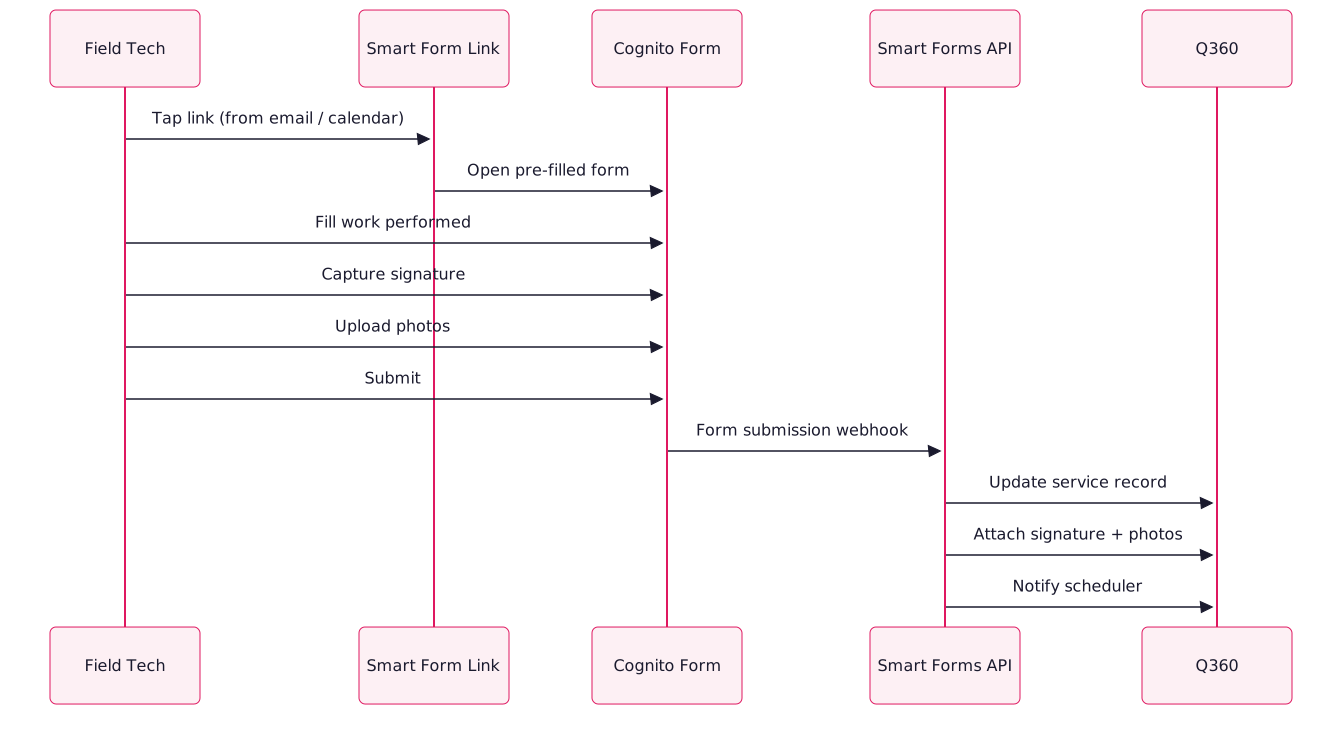
Technicians submit a branded Cognito form from their phone. Smart Forms attaches the sign-off, photos, and notes to the corresponding ticket, project, or sales order in Q360.
Form capabilities
- Links employee touch-points to customizable forms: each type of work (install, service, decommission, survey) gets its own form with the fields that type of work actually needs
- Stores data directly within Q360 records: no separate form archive to search; the form result lives inside the service ticket, project, or sales order it belongs to
- Captures signatures during sign-out: customer or technician signature captured on the phone, attached to the Q360 record as an image
- Collects and organizes images: photos of completed work, equipment serials, wiring diagrams, all tagged and attached to the record
- Notifies the scheduling team: if the form flags a follow-up ("couldn't complete, needs second visit," "parts ordered," "customer declined sign-off"), schedulers get an immediate notification
Form access
Requirements
- Q360 API user: we need a service account with write access to service records, attachments, and notes
- Cognito Forms Pro account: Smart Forms is built on Cognito Forms as the form engine (cheap, reliable, mobile-friendly)
- Rubi integration layer: our service that ties the two together and handles field mapping, attachment processing, and Q360 writes
Who it’s for
- AV integrators closing out multi-day installs and handing off to customer IT teams
- Security installers documenting camera positioning, credential issuance, and system commissioning
- Service technicians on ticket work who need to capture "what was actually done" and get customer sign-off before leaving
- Project managers supervising subcontracted field work who need consistent reporting from external crews
FAQ
Most teams use 3–6 forms with different fields, such as install, service, survey, decommission, or warranty. A new form type usually takes a few hours to add.
Cognito Forms supports offline mode: the tech can fill the form without signal and it uploads when they reconnect. Our Q360 write happens after upload, so the end result is the same.
The integration can fire a nudge notification if a scheduled form hasn't been submitted by a specified time (usually end of business day). Keeps the submission rate above 95% even for new tech hires.