
Scheduling overview
Dispatchers and project managers use Q360 for skill matching, availability, and capacity. Field technicians, account managers, and executives often work from Outlook or Google Calendar. Synchronizing the schedules helps them catch assignments and location changes before they double-book or go to the wrong site.
How calendar sync works
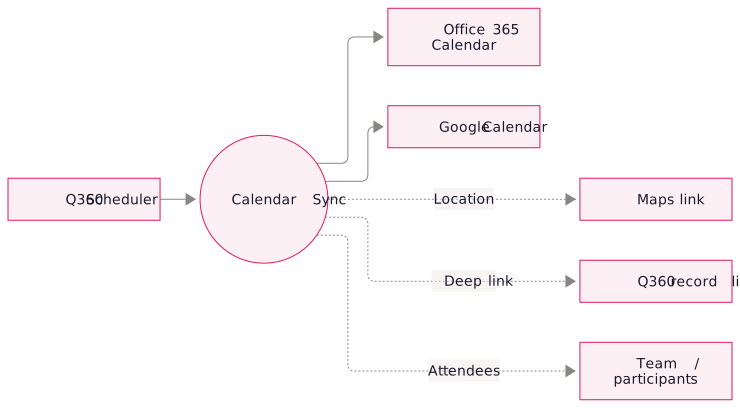
Q360 remains the scheduling source. We sync its events to Microsoft 365 or Google Calendar and tailor what each role sees. Selected calendar actions can also update Q360 when configured.
Calendar features
- Event sync: Q360 service calls, project schedules, and HR reservations push automatically into each assigned person's connected calendar
- Rich event detail: calendar entries include the job address (with a clickable map link), a deep link back to the Q360 record, and the equipment/work summary
- Live updates: changes to job time, location, or assignment update the existing event in place
- Customizable presentation: titles, descriptions, and attendee lists are configurable per event type so service calls look different from project visits or HR reservations
- Low maintenance: once configured, the integration runs without supervision. New hires inherit the sync by joining their calendar account to the integration.
Use cases
Technology stack.
- Office 365 Graph API for Microsoft calendar integration, works with personal Exchange mailboxes and shared team calendars
- Google Calendar API for Google Workspace deployments, including delegated access for shared calendars
- Q360 API for reading scheduled events, assignments, and change events
- Rubi sync service that polls (or listens to webhooks where available), applies customization rules, and maintains event state across all target calendars
FAQ
Primarily one-way (Q360 → calendar). Q360 stays the source of truth for job scheduling. We can optionally configure selective bidirectional sync for specific actions (e.g. a tech accepts or declines a job from their calendar and the status flows back to Q360), available as an advanced option.
Supported. We can sync to personal calendars, team calendars, resource calendars (room reservations for training days), or any combination. Common pattern: individual calendars for techs, plus a "Dispatch Board" team calendar that supervisors watch.
Yes. The integration writes to their mailbox calendar, so they need a valid Microsoft 365 or Google license.