
Staff communications
Home care agencies run scheduling, documentation, care planning, and visit verification in AlayaCare. As they grow, coordinators often use spreadsheets and personal phones to manage staff communications alongside AlayaCare's messaging and visit notifications.
Agencies we've worked with report spending 15 or more hours per week manually coordinating those communications.
Modules
Rubi Space adds three independent Python modules for bulk SMS, scheduled notifications, and credential tracking. Start with one or combine them. They share an AlayaCare API connection and Twilio account, with one setup and one Rubi bill. Caregivers keep their existing clinical workflows.
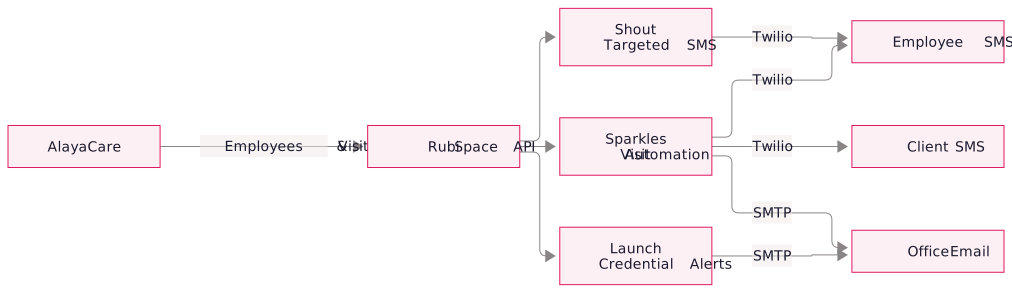
Shout: targeted texts
Shout lets a coordinator send one message to a specific group of employees.
- Filter by real AlayaCare fields: branch, department, skill group, active/inactive status, and job designation all pull from AlayaCare directly, so the list is always in sync.
- Preview before you send: see exactly which names are on the list, then refine the filters until the recipient set is right.
- Message history: every blast is logged, so you can audit what went out, when, and to whom.
- Two-segment message cap: messages are capped at 320 characters to keep costs predictable and deliverability high.
For a training reschedule, the Denver office can text active caregivers in its branch who hold a CNA certification.
Sparkles: visit automation
Sparkles queries AlayaCare on a schedule and sends reminders and alerts according to your rules.
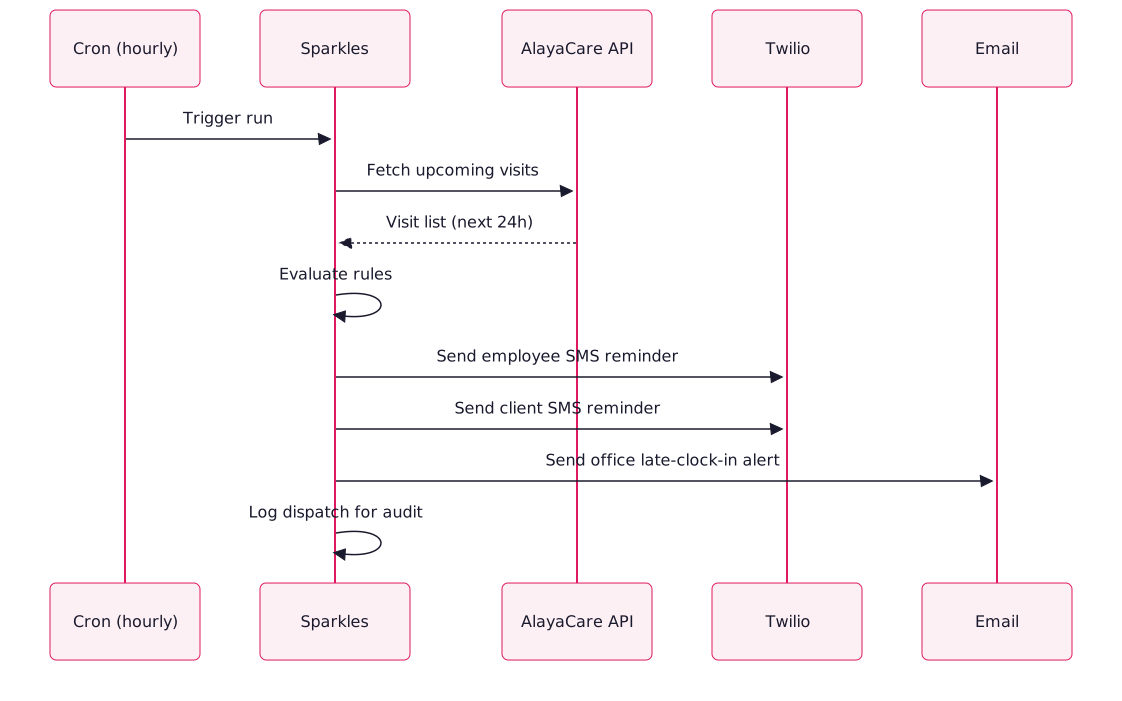
- Upcoming visit reminders: caregiver gets an SMS the evening before or hours before each scheduled visit.
- Late clock-in / clock-out alerts: Notify the office if a caregiver misses a clock-in or clock-out by a configurable number of minutes.
- Client confirmations: the family or client gets a reminder too, configurable per service line.
- Birthdays & anniversaries: Send employee greetings automatically.
- Webhooks: for agencies that want to pipe events into Slack, Teams, or their own systems.
Templates can include the caregiver's first name, client name, visit time, address, and special notes from the visit record.
Launch: credential alerts
Launch emails the office before credentials recorded in AlayaCare expire, giving staff time to renew them before a visit is affected.
- Daily run: Launch checks every active employee once a day against AlayaCare's skill expiry dates.
- Configurable lead times: 30, 60, 90 days before expiry, or whatever your compliance policy requires.
- Skill-level granularity: alert on specific skills only (CNA, HHA, BLS, TB test) or on everything tagged as a credential.
- Branch-aware: reminders route to the right office email per branch, so nobody's drowning in another region's noise.
Pricing
Station: Complex multi-branch or multi-cluster agencies where each branch runs independently.
Station: Dedicated Twilio number per branch so recipients see a local sender.
Station: Branch-scoped access so Denver can't accidentally blast Seattle.
Station: Each branch sets its own message templates, dispatch rules, and reminder windows.
Station: 2+ weeks depending on number of branches and config complexity.
SMS costs
You pay Twilio directly for SMS, without a Rubi markup. Twilio charges per segment. A typical message uses one 160-character segment, sometimes two.
At an example rate of $0.0075 per segment, sending one single-segment reminder for each of 100 daily visits costs about $273.75 a year.
Implementation
- Scope and proposal. Choose your modules and configuration, and we send a fixed-price proposal.
- Onboarding checklist. Confirm phone fields and email allowlisting, get service-account API read access for employees and visits, and connect your Twilio account and SMS numbers. We can help you set up Twilio.
- Configuration. Use a short form to specify filters, templates, reminder windows, and routing rules.
- Staging and rollout. Run a dry-run against your employee list, verify test messages, then go live together and monitor the first dispatch. We usually switch over mid-week.
- Ongoing support. We handle changes to configuration, rules, and reporting through our standard support channels.
FAQs
You pay Twilio directly. No markup. At US/CA standard rates, a single-segment SMS is approximately $0.0075. Our pricing covers the platform and config; SMS volume costs are yours.
SMS notifications target the phone_main field on both employee and client records in AlayaCare. Make sure it's populated and formatted as E.164 (+1XXXXXXXXXX) for best deliverability.
Existing Rubi Space customers can find sender details and email delivery setup in their onboarding instructions.
Inbound SMS replies are handled automatically. STOP / UNSUBSCRIBE messages are processed by Twilio's compliance layer and the recipient is removed from future sends. Other replies are forwarded to a designated office email so a human can follow up.