
Lone-worker safety
Overnight caregivers, solo installers, and security guards on rounds may work without a colleague nearby. Supervisors need a check-in they can act on when someone asks for help or misses a response.
Some agencies want that safeguard without per-user safety apps, extra hardware, or continuous location tracking.
SMS check-ins
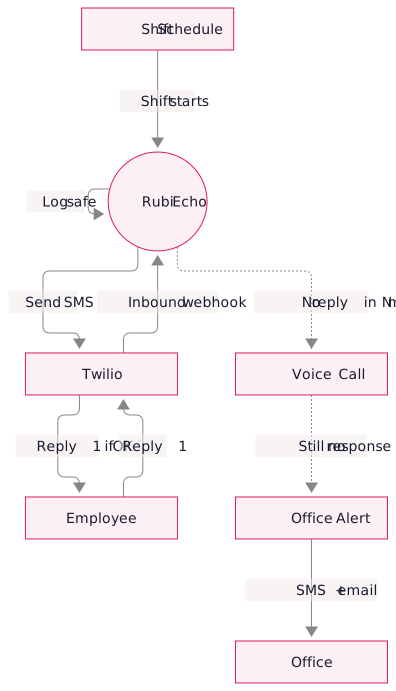
Echo texts the worker at set times during a shift: “Reply 1 if you're OK, 2 if you need help.” It logs the response and escalates when the reply window closes or the worker asks for help.
Workers use any SMS-capable phone without a new app. A Python service uses one Twilio number and applies rules based on your employee directory.
Check-in schedules
A 12-hour overnight visit can use a different check-in schedule from a four-hour solo installation.
- Interval-based: check in every 2, 4, or 6 hours across the shift
- Time-offset: first check 30 minutes after shift start, second at halfway, third at shift end
- Fixed windows: check in at specific times (e.g., 23:00, 02:00, 05:00 for overnight care)
- Per-role rules: caregivers get one pattern, installers get another, security staff get a third
- Client-specific rules: Exempt low-risk sites or check in more frequently at higher-risk sites.
Escalation
Choose the steps Echo takes after a missed check-in.
Schedule integration
Echo reads your live schedule from AlayaCare, Q360, or NetSuite. Schedulers can tag visits as “lone-worker,” “overnight,” or with your own labels. Echo applies the matching rule and follows schedule changes automatically.
Audit trail
Echo logs each check-in, response, escalation, and outcome. Agencies can use the record to show how they monitored lone workers where required and to review how supervisors respond during overnight shifts.
Use cases
- Home care overnight visits: confirm the caregiver arrived, is awake, and is fine during the shift
- Solo installation jobs: AV integrators, security installers, field technicians on remote sites
- Night-shift supervision: building managers, security guards, warehouse ops
- Travel risk: staff on long solo drives between client sites
- Post-incident follow-up: temporary high-cadence monitoring after a safety event to ensure recovery
FAQs
Echo skips reminder steps and alerts the office immediately, including the worker's name, location, and last known context.
Echo retries undelivered messages. If the phone stays out of coverage through the reply window, Echo follows the missed check-in procedure.
Yes. Echo also accepts shift data through an API, CSV file, or webhook.
You pay Twilio directly for SMS and voice, plus the Echo platform fee. As an example, about 50 monitored overnight shifts per week can generate $40–60 per month in Twilio charges.