
Scheduling challenges
Q360’s resource console matches skills and availability for individual assignments. Multi-site installs, weeks-long projects, and last-minute crew changes can mean re-entering the same assignment many times. Double-bookings may surface later in a conflict report, after someone has committed to a date.
Our Q360 clients were spending hours a week on that manual scheduling, so we built an extension to handle it.
How the module works
The module adds batch assignments, recurring schedules, and conflict checks alongside Q360’s native console.
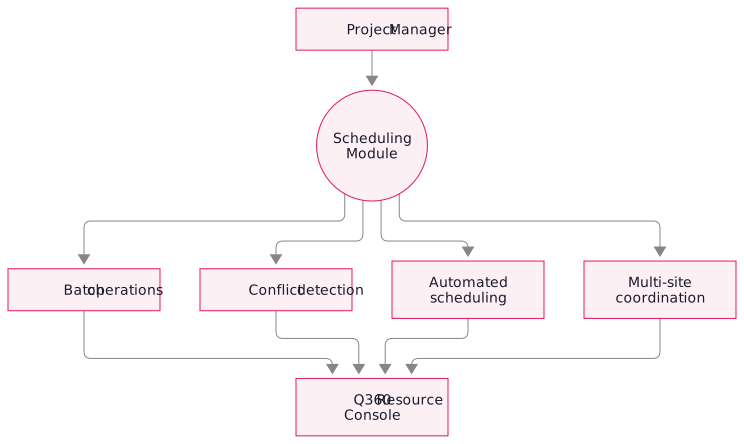
Scheduling features
Who it’s for
- AV integrators running multi-site installations for retail, hospitality, or corporate clients where the same crew moves between locations
- Security installers with recurring service contracts across many sites
- Managed services providers with techs rotating between client sites on recurring schedules
- Project managers coordinating teams of 5-50 techs across overlapping projects where conflict detection matters
- Dispatchers handling last-minute schedule adjustments when a key tech is unavailable
Technology stack.
- Q360 database integration: the module reads and writes directly against Q360's scheduling tables through a secure access layer
- Custom UI: a web-based interface that sits alongside Q360 and provides the batch operations the native console lacks
- Real-time conflict detection engine: queries Q360 on every assignment change to surface conflicts before they land
- Role-based access control: respects your existing Q360 user roles so nobody gets more access through the module than they'd have natively
FAQ
Project managers can still use the native console for individual assignments. The module works alongside it on the same schedule.
No. The module writes through the same Q360 data model the native console uses: every change creates a normal Q360 assignment record. Your reports, integrations, and billing all continue to see the data exactly as they did before.
When you propose an assignment, the module queries Q360 for any overlapping existing assignment for that resource and shows you the conflict inline, before you save. You decide whether to override, reassign, or cancel.