
Clinical and accounting data
Home care agencies keep visits and billing in clinical software such as AlayaCare. Their books live in a separate system, such as QuickBooks, Xero, NetSuite, Sage Intacct, or Dynamics 365.
With a manual handoff, staff export billing data to Excel, enter journal entries, and calculate revenue for unbilled visits separately at quarter-end. Summary entries can also hide invoice detail and slow down branch reporting. In the agencies we've worked with, reconciliation can take 20–40 hours per month.
FinanceLink overview
FinanceLink connects clinical and accounting systems. It moves ledger entries, invoices, and payments, then gives finance staff a place to fix failed transactions.
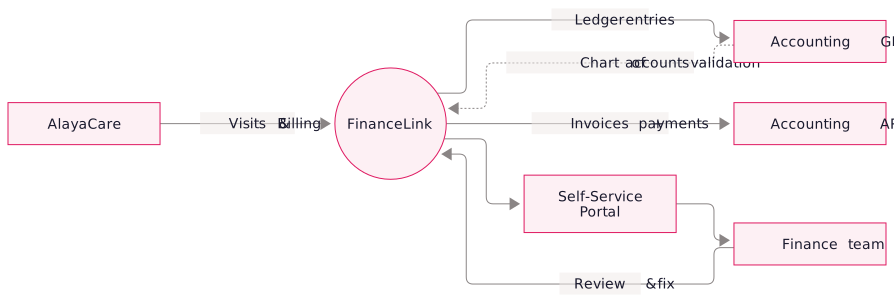
FinanceLink capabilities
Ledger Sync
Post revenue, cost of service, and payroll accruals to the general ledger.
- Configurable summarization: Group entries by date, branch, customer, or service line.
- Chart-of-accounts validation: Reject transactions to inactive or missing accounts before posting.
- Revenue recognition: Set accrual timing to visit completion, visit verification, or billing-cycle close.
- Branch and cost-center mapping: Post to the correct accounting dimensions automatically.
Invoice Sync
Sync invoices, payments, and customer records at the level of detail your team needs.
- Draft or finalized: Let AR review drafts before sending or finalize invoices automatically.
- Optional line-item detail: Keep each visit or summarize by service, week, or client.
- Custom descriptions: Use templates such as “July home care services” in place of raw visit descriptions.
- Customer company sync: Create accounting customers from AlayaCare organizations with billing terms, contacts, and addresses.
Self-Service Portal
The finance team can review and fix posting problems without digging through system logs.
- Sync status dashboard: See which records synced, are queued, or failed.
- Error review: See the reason, such as an account mismatch, missing customer, or invalid amount, then correct or requeue the transaction.
- Audit log: Trace each event by timestamp, source record, target record, and outcome.
- Manual replay: Re-sync an individual record or date range without calling support.
Supported platforms
Roadmap: MatrixCare, Kinnser, CareVoyant, and other major home care platforms.
Benefits for finance
- Faster close. Ledger entries can post within minutes of visit finalization, with automated accrual cutoffs.
- Branch-level P&L. Review a branch's margin at quarter-end without waiting for manual reconciliation.
- Faster invoice questions. Staff can check the visit or service behind an invoice line while talking to a client.
- Source traceability. Open the AlayaCare source record from the ledger entry.
FAQs
FinanceLink maps AlayaCare billing categories to your existing accounts using a configurable table. Finance sets the rules and FinanceLink applies them on each sync.
FinanceLink posts reversing and corrected entries so the ledger reflects the change without double-counting.
Yes. We typically start with two to four weeks of preview so finance can check what would post and verify the mappings before anything hits the live ledger.
A one-time setup fee plus a monthly subscription based on transaction volume and connected accounting systems. There are no per-user fees.