
Overview and demos
Caregivers, field technicians, and installers can send updates from any phone by SMS. Their coordinators work in Slack or Microsoft Teams. When a coordinator has to copy messages between the two, everyone can end up working from a different version of the conversation.
How it works
When a caregiver texts the agency's Twilio number, Rubi Bridge routes the message to the right Slack or Teams channel. Staff reply in the thread, and Bridge sends the reply from the same agency number. Both teams keep using the tools they already know.
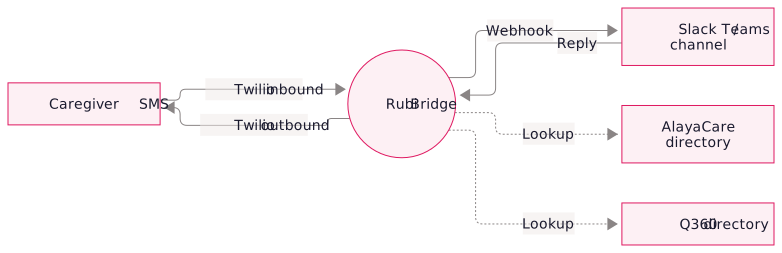
Directory routing
Bridge looks up the sender's number in your existing employee and client directories. It syncs with AlayaCare or Q360 and can use other directory sources, such as a CSV import.
- Sender context. Staff see the sender's name, role, branch, and current visit or job in the thread.
- Routing rules. Route messages by client, branch, or role, or send them to a general intake channel.
- Recent history. The last few exchanges with the sender are available in the thread.
Supervisor handoffs
If a caregiver texts that they'll be late for a visit, the coordinator can bring a supervisor into the thread. The supervisor can see the original update, discuss coverage with the coordinator in an internal note, and reply to the caregiver from the same conversation.
Channel and audit controls
- Channel lifecycle. Create channels on demand for a client, visit, or incident and archive them when the conversation ends.
- Internal notes. Keep handoffs and office discussion in the channel without sending them as texts.
- Message history. Review incoming texts and outgoing replies with timestamps and user attribution for audit.
Roadmap
If you use Rubi Space for visit reminders and credential tracking, Bridge adds live conversations using the same AlayaCare integration, Twilio account, and Rubi support.
Rollout
- Map the workflow. Confirm your collaboration platform, Twilio number, directory source, and routing rules.
- Connect and test. Install Bridge, configure the employee and client lookups, and test message routing in staging.
- Pilot for a week. Start with one branch or service line, then roll out to the rest of your staff once the workflow is steady.
FAQ
Yes. We can connect an existing number or help you set up a new one. Your agency owns the number and account and pays Twilio directly.
The message stays in the channel until someone picks it up. For urgent situations, you can configure an email alert, PagerDuty page, or on-call channel.
The caregiver sees a regular text conversation with the agency's number. You can explain where messages are routed in your staff communication policy.
Bridge can be configured with a Twilio BAA, encryption at rest, and minimal PHI retention. During discovery, we'll review with you whether your Slack or Teams setup is covered under your HIPAA compliance program.