
Q360 collections
System integrators use Solutions360's Q360 for project management, inventory, service tickets, and CRM. Once an invoice goes out, accounts receivable teams often handle reminders, card payments, and reconciliation by hand.
Staff may export an aging report to Excel, write follow-up emails, take payments over the phone, and post the same payment in the gateway and Q360. Each handoff takes time, can introduce errors, and gives customers fewer ways to pay.
Payment options
Both editions post cleared payments to the correct Q360 invoice automatically. Choose customer self-service and collections automation with Portal, or add a pay link to each invoice with Links.
Portal edition
Portal connects Q360 to Invoiced to run automated collections and a branded payment portal.

- Invoice + customer sync: new invoices in Q360 flow to Invoiced within minutes, with line-level detail and customer account mapping
- Automated delivery: email or physical mail, configurable per customer
- Multiple payment methods: credit card, ACH, wire, PayPal, auto-pay on file
- Collections automation: dunning email sequences fire automatically based on aging buckets (30/60/90 days)
- Customer self-service: View open balances, pay invoices, set up auto-pay, download statements, and update cards on file.
Links edition
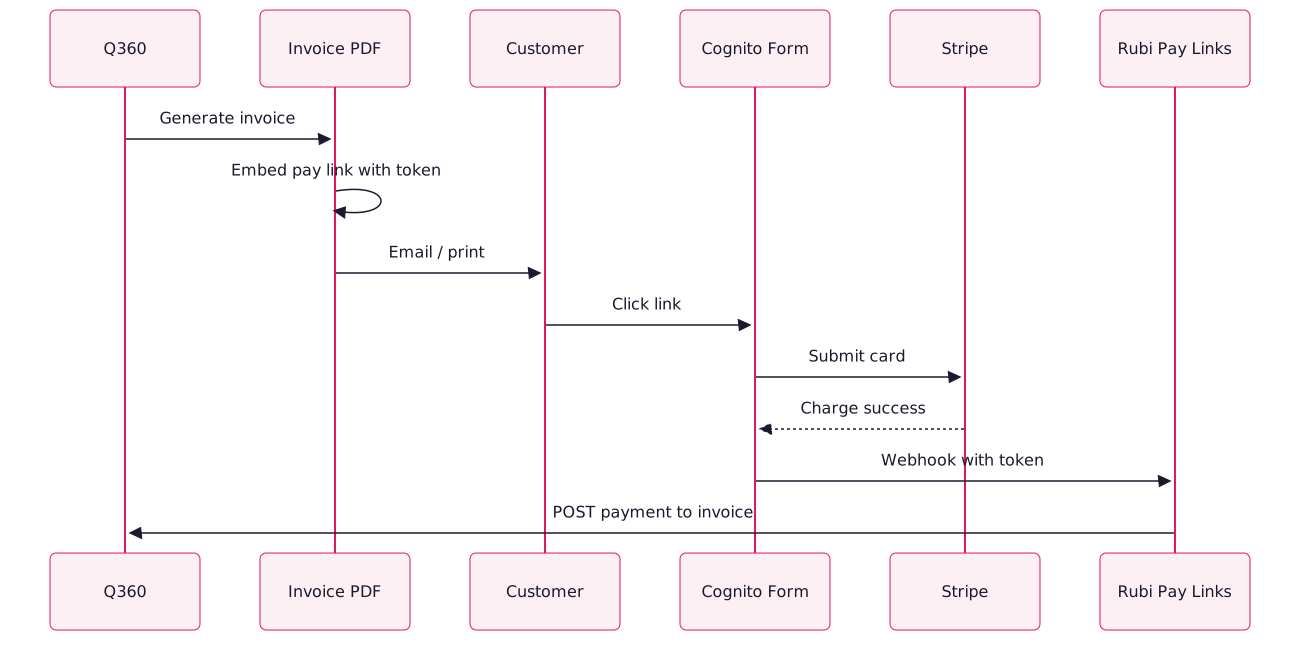
Each Q360 invoice PDF and email includes a secure payment link. It opens a Cognito Forms page connected to your Stripe account, where customers can pay by card without creating an account.
Compare editions
Links: 1 week if your Stripe account is already set up.
Payment results
In prior deployments, teams reported 30–50% faster payment cycles and 8–15 hours per week back from manual reminders and phone payments. Posting to the correct invoice also cuts reconciliation errors.
After adopting Portal, a 40-person AV integrator cut weekly AR follow-up from eight hours to under one and average days to pay from 38 to 19.
FAQs
Portal requires Invoiced. Links uses Cognito Forms and Stripe.
Yes. Start with pay links and move to Portal as AR volume or team size grows.
Yes. Both editions support partial payments, such as project milestones. Q360 retains the remaining balance.
Portal supports ACH through Invoiced. Links supports it when your Stripe account has ACH enabled.