
Where Invoiced fits
Invoiced helps AR teams collect payments and reduce manual work through a branded customer portal, dunning, payment processing, and subscription billing.
The surrounding systems still matter. Customers live in the CRM, invoices start in the ERP, and signed contracts and supporting documents may live in DocuSign or SharePoint.
Without an integration layer between those systems, AR staff still have to copy invoices and customer updates into Invoiced.
Invoiced integration services
We're an experienced Invoiced implementation partner. Our integrations have processed hundreds of millions of dollars in receivables across the six service categories below.
Invoiced is the engine. Rubi is the plumbing that makes it run inside your specific ERP, CRM, and document stack.
Service categories
Integration architecture
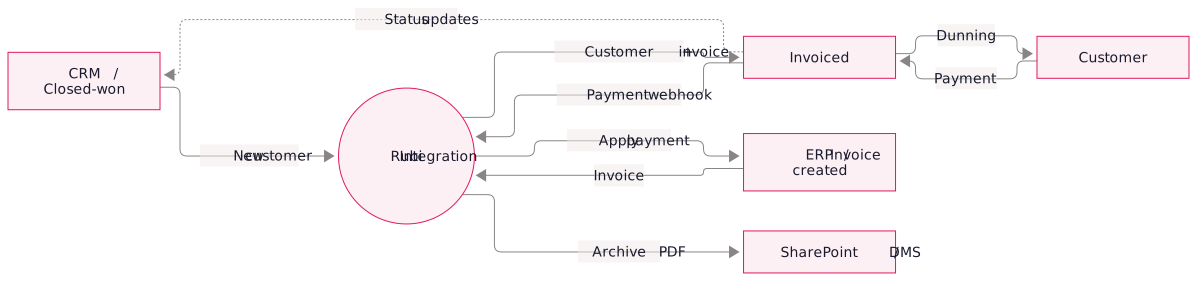
Integration safeguards
- Idempotent syncs: webhook replays, dry runs, and restarts avoid posting duplicate charges.
- Error visibility: diagnose failed syncs and replay them from a self-service dashboard.
- Reconciliation: verify that the same invoices appear in the ERP and Invoiced.
- Configurable rules: change customer mapping, templates, payment application, and sync timing without developer involvement.
- Handling exceptions: account for customer merges, partial payments, credit memo reversals, and currency conversions.
Implementation process
- Discovery. Map the ERP, CRM, and document systems, and agree which Invoiced features to introduce first.
- Integration design. Assign an authoritative system for each record type and define sync, error handling, and reconciliation rules.
- Build and test. Develop and dry-run the sync in ERP, CRM, and Invoiced test environments.
- Invoiced configuration. In parallel, we configure Invoiced itself: branded templates, dunning workflows, payment methods, customer portal setup.
- Soft launch. We enable the sync in "review-only" mode for 1-2 weeks so your team can spot-check before invoices actually go out.
- Full cutover. Go live and monitor syncs closely throughout the first month.
- Ongoing operations. Many of our clients keep us on retainer for new ERP releases, Invoiced feature adoption, and reconciliation support.
Frequently asked questions.
Yes. We've connected Odoo, custom ERPs, Microsoft Access, and legacy AS/400 systems. We need a way to export the data or access it through an API.
Small (single ERP, ~5k customers, single invoice template): 4-6 weeks. Mid-size (multi-currency, 20k+ customers, custom dunning): 8-12 weeks. Enterprise (multi-entity, complex billing rules, document management): 3-5 months.
We use native connectors for platforms such as QuickBooks and Xero where they fit. We use the Invoiced API when the workflow needs custom rules.
Yes, we have reference clients in home care, AV integration, B2B services, and SaaS who are happy to share their experience. Book a meeting and we'll arrange an intro.