
Database write-back
Power Query brings database data into Excel for review. When finance or operations needs to correct values, bulk-update records, or add rows, someone still has to write those changes to the database. Teams often send the spreadsheet to a developer for a one-off SQL script.
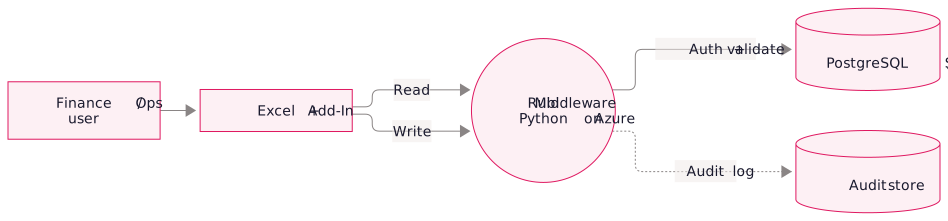
Write-back needs validation, transaction control, error handling, access controls, and an audit log.
How the add-in works
Install the add-in from the Office Add-In Catalog, then use its Excel ribbon tab to connect to a database, select rows, and write changes. Each write is logged.
Add-in features
Use cases
- Finance teams bulk-updating vendor terms, customer credit limits, or tax codes after a rate change
- Operations teams correcting data in inventory records, customer attributes, or project fields without waiting on IT
- AR/AP teams applying bulk adjustments, credit memos, or write-offs based on an Excel review spreadsheet
- Sales teams updating opportunity stages, close dates, or custom fields across many records at once
- Data correction workflows where a monthly reconciliation reveals 50 records that need to be fixed, with no more handing that spreadsheet to a developer
Technology stack.
- JavaScript frontend: using the Office JS API, the same technology Microsoft's own Excel add-ins are built on
- Python middleware on Azure: handles authentication, validation, schema introspection, and safe SQL generation
- PostgreSQL / SQL Server / others: target database is configurable; the middleware translates Excel operations into safe, parameterized SQL
- Office 365 auth integration: users authenticate with their existing Microsoft account; no separate login
FAQ
Yes, we've deployed it on top of Q360 specifically for finance and operations teams who want controlled write access without giving them direct SQL rights. Works with Q360 Live Data and the SQL Report API.
The middleware enforces schema validation, required fields, foreign key checks, and any custom rules you define (e.g. "status can only be one of these 5 values"). Bad data gets rejected with a clear error before it hits the database.
If one row fails, the whole batch rolls back. Admins can also reverse a completed bulk update using write snapshots retained for a configurable window, typically 30 days.