
Q360 data processing
Q360 teams often rely on spreadsheets, macros, or one-off scripts to handle bank CSVs, card transactions, payroll exports, vendor rebate reports, and month-end journal entries. These jobs are easy to miss until a file changes or the person who owns the process is away.
In our audits, we typically find at least half a dozen background processes with limited documentation or a single owner.
Managed data processing
Rubi builds and maintains the pipelines around Q360 using the files and systems your team already works with.
The boring data work that every Q360 shop accumulates over a decade. We take it off your plate and make it reliable.
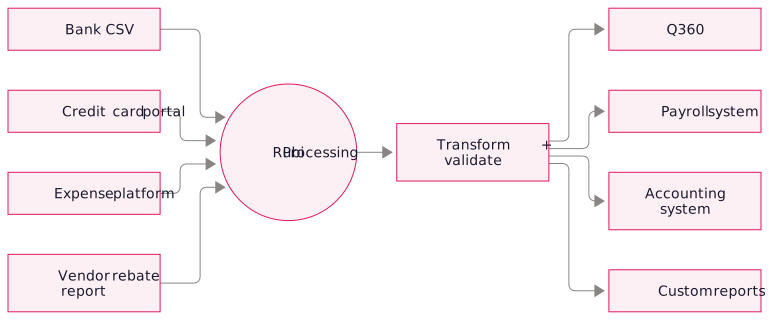
Common use cases
Pipeline implementation
- Discovery. We map where files come from, where they go, who handles them, and what breaks.
- Prioritization. We start with the most time-consuming or error-prone process.
- Build. We connect the file formats, reporting tools, and APIs the process depends on.
- Dry run and validation. For 2–4 weeks, your team compares report-only output with the manual results.
- Go live. We switch on automation, monitor closely for one month, and continue routine monitoring.
- Maintenance. We handle new edge cases, vendor format changes, and incremental improvements.
Technology stack
- Q360 API + Live Data Reports + SQL Report API: for reads and writes against the ERP
- CSV + spreadsheet processors: robust parsers that handle weird encoding, missing headers, split files, and other edge cases every real-world file has
- Third-party integration APIs: expense platforms, payroll systems, banks, vendor portals
- Data transformation engine: our internal tool for declarative transformation rules; field renames, value mappings, aggregations, enrichment
- Scheduled execution: typically Azure Functions or a similar cloud scheduler; reliable, observable, alertable
Frequently asked questions
Yes. Start with one high-effort process, then decide which others to automate after seeing the results.
When a bank or vendor changes its file format, we update the transformation rules as part of ongoing maintenance, without billing it as a separate project.
Power Automate suits simpler flows. We use Python and SQL when volume or transformations require more control, with error handling, retries, and monitoring.