
Manual intake
New clients submit medical history, service agreements, insurance and emergency contact details, consent forms, and HIPAA acknowledgments. New caregivers submit applications, tax forms, credentials, direct deposit details, I-9s, and other employment agreements.
When a form or a signed PDF sits outside AlayaCare, staff still have to re-enter the details by hand for each admission or hire.
AlayaCare intake integration
Advanced Intake captures the form and signature, creates or updates the AlayaCare record, attaches signed documents, and notifies the intake administrator. The submission and its supporting documents stay linked for audit.
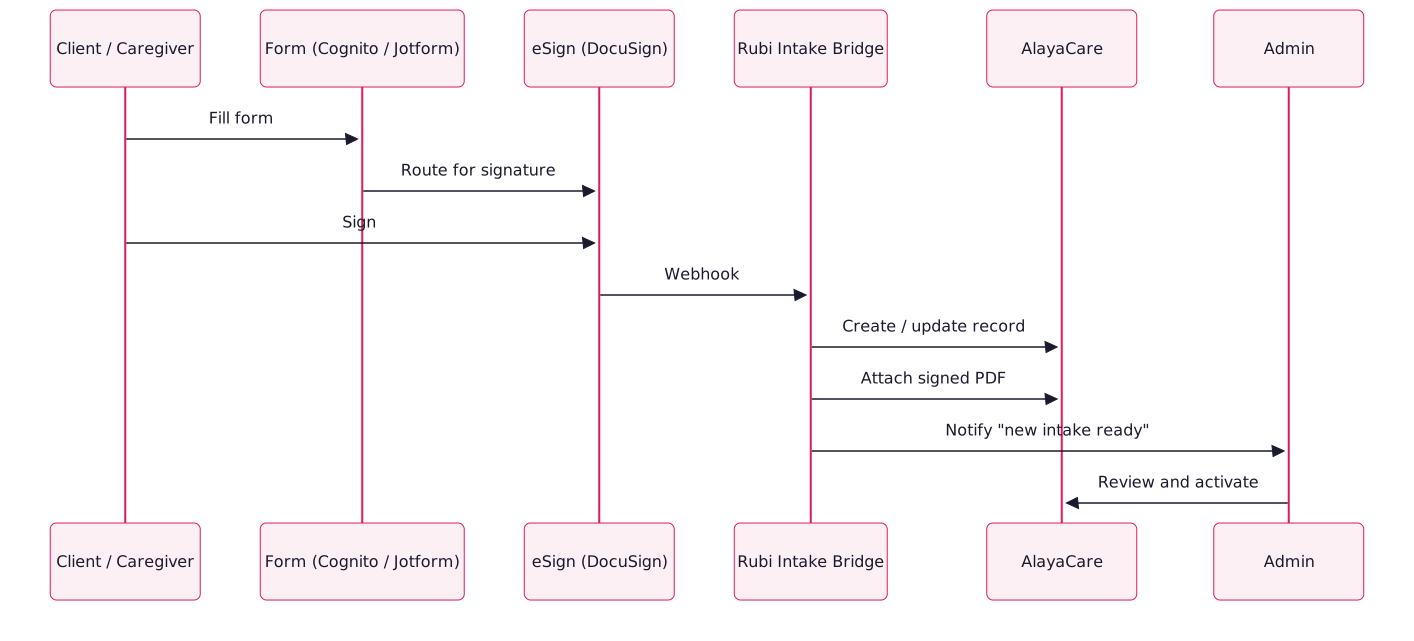
Intake workflows
Integration features
- Configurable field mapping: Send form responses to the correct standard or custom fields in AlayaCare.
- Signed document archive: Keep each signed document with the AlayaCare record for audit and compliance.
- Approval checkpoint: Require an administrator to review the record before activation when needed.
- Duplicate detection: Match existing records by email, phone, or SSN so updates go to the right record.
- Notifications: Alert multiple administrators by role or branch when an intake is complete.
FAQs
Cognito Forms and DocuSign offer HIPAA-compliant tiers. The integration runs in a BAA-covered environment and retains PHI only as long as needed to write the AlayaCare record.
Yes. Keep your existing branded forms or customize them in the form builder. Rubi connects them to AlayaCare.
Typically two to three weeks, mostly for field mapping. We can connect forms you already have in Cognito or DocuSign.