
Odoo access for AI agents
An AI agent can create tasks, update records, and prepare reports in Odoo. Teams need control over which actions it can take and who those actions are attributed to.
The Rubi Odoo MCP uses Model Context Protocol (MCP), an open standard for connecting AI clients like Claude to a defined set of Odoo tools.
The walkthrough shows single sign-on, browser-based user key registration, and per-model permissions. Claude creates and completes 25 tasks from a spreadsheet. It can clean up contact tags, but project and task deletions are blocked.
API keys and scoped access
An Odoo XML-RPC key inherits all permissions of the user it belongs to. If that user can delete a customer or edit an invoice, an agent using the key can do so too.
An autonomous agent can act at machine speed. The connector adds operation-level limits before requests reach Odoo.
An AI agent is a toddler with superpowers. You don't hand it the keys to everything and hope. You childproof the room first.
Gatekeeper architecture
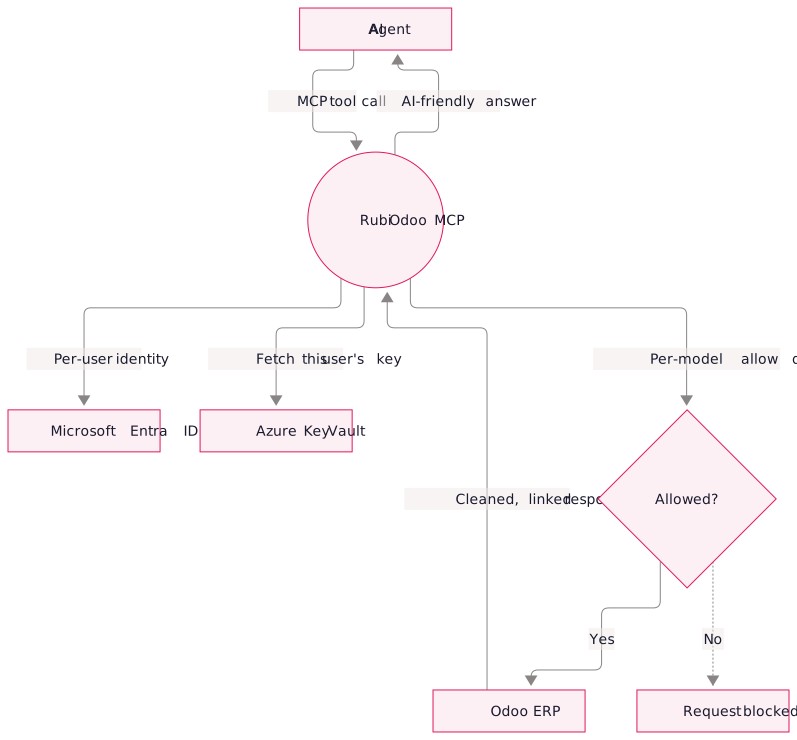
The MCP server authenticates the user, retrieves their credential, checks permissions, and brokers the Odoo request. The agent receives the result.
Working with Odoo records
The toolset covers the full lifecycle of working with records: discovery tools such as list_models and get_model_fields, reading tools such as find and search_records, and writing tools such as create_records (batch up to 100 in one call) and update_record, plus more for calling custom methods and filing a Helpdesk ticket straight from the conversation.
Identity and model permissions
Per-user identity. Each request uses Microsoft Entra ID single sign-on. The user registers their personal Odoo API key through a browser-only step, and Azure Key Vault stores it outside the chat.
Model-level permissions. The MCP applies per-model limits on read, create, update, and delete operations in addition to Odoo's own permissions. You can allow task updates while blocking project deletions.
Response format
The server accepts familiar names such as "contacts" for res.partner and "tasks" for project.task. It removes HTML, converts related fields into readable names, and returns a clickable link for each record.
Related MCP connectors
The same access pattern applies to Microsoft 365, Loom, and other systems with APIs. Q360 and AlayaCare connectors are in development, alongside command-line versions for governed automation.
Frequently asked questions.
The AI provider receives the results the agent requests. Odoo credentials stay in Azure Key Vault.
Revoking the user's Entra access or removing their vaulted key cuts off the connector's access for that user immediately.
Yes. For example, allow reading and updating tasks and block agent deletes even when the user can delete records directly in Odoo.