
Project data and financial forecasts
Project managers use boards, tasks, dependencies, comments, and mobile dashboards in their project tools. Finance needs Q360 to reflect that work for budgets, invoicing, and revenue forecasts.
For projects that run 3–12 months, a weekly manual export leaves the revenue forecast up to a week behind. It also delays visibility into changes in project margins.
How the integration works
Rubi connects project management tools with Q360 so project managers can keep their preferred tools and finance can forecast revenue from the same project data.
PMs work in Asana. Finance forecasts in Q360. Both are always looking at the same numbers.
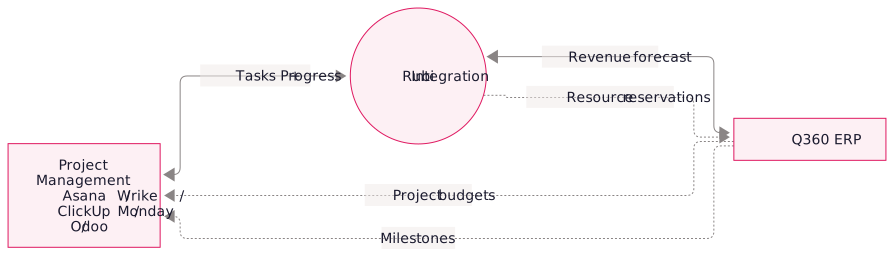
Supported project management tools
- ClickUp: API access and flexible custom fields
- Asana: a straightforward data model with a documented API
- Wrike: enterprise project reporting with a moderately complex integration
- Monday.com: boards that map to Q360’s project structure
- Odoo Projects: part of our Odoo practice; integrates cleanly with Q360 when one shop runs both
- Other API-capable PM systems include Teamwork, Jira, Notion, and Linear.
What the integration delivers
Technology stack
- Q360 API + Live Data: reads for budgets, customers, employees; writes for forecasts, time entries, and events
- PM platform APIs: Asana, Wrike, ClickUp, etc. for project, task, and time data
- Azure Cloud Resources: we typically run the integration service in Azure for reliability and monitoring
- Webhook + polling hybrid: real-time updates where the PM tool supports webhooks; scheduled polling as a fallback
Integration options
- Partial (read-only forecasting). PM tool data flows into Q360 for forecasting but nothing flows back. Low-risk first step; great for shops that want to keep the PM tool "untouched" and just extract data.
- One-way push (PM → Q360). PM data pushes to Q360 for forecasting, resource allocation, and billable events. Change orders still originate in Q360. Most common pattern.
- Full bidirectional. Both systems exchange data in both directions. Higher complexity, but highest value for large shops where PMs and finance work tightly together.
Frequently asked questions
Allow 3–5 weeks for partial integration, 6–10 for one-way sync, and 10–16 for bidirectional sync. Project complexity and customizations affect the timeline.
We can use the project management tool as the source of time entries and sync them to Q360 for project accounting and payroll.
Yes. During discovery, we compare tools based on your team’s needs, integration effort, and pricing. Our recommendations are vendor-independent.